Airbnb Bookkeeping: What Hosts Should Record Before Tax Time
For a host, one practical challenge before tax time is that information can be scattered: bookings in one dashboard, deposits in a bank feed, receipts in a glovebox, cleaner invoices in a text thread. This guide covers what an Airbnb host can record through the year so that whoever handles the accounting next — a bookkeeper, an accountant, a tax professional, or accounting software — starts from organized records instead of reconstruction.
What Airbnb bookkeeping means for an operator
At a high level, bookkeeping is the practice of recording and organizing your business's financial activity consistently over time: what came in, what went out, when, and against which part of the business.
It is worth being precise about roles here, including Blueprint's. Blueprint is an operational record-keeping and visibility system for vacation-rental owners. It is not accounting software, bookkeeping software, or tax software, and it does not replace a bookkeeper, accountant, or tax professional. Nothing in this article is tax or accounting advice; questions about how anything should be reported belong with a qualified professional who knows your facts and jurisdiction.
The practical problem for a short-term rental operator is fragmentation. Booking detail lives in a platform dashboard. Deposits arrive in a bank account as net amounts. Supplies go on a personal card. A cleaner invoices by text or gets paid through an app. Utilities and software fees renew quietly. Each piece is individually simple, and together they can be hard to reassemble months later.
Good bookkeeping starts before any of that reaches an accountant. It starts with recording the business's own activity as it happens, in a form that still makes sense in March.
Start with the records your operation actually creates
You do not need to invent a filing system. Your operation already produces records; the work is preserving them consistently and keeping them associated with the property they belong to. These are examples of what is worth retaining through the year, not tax classifications.
- Reservation and booking detail. Guest stay records as your operation knows them: the stay itself, the nights involved, and what the booking was worth to you.
- Booking dates and property. Check-in and check-out dates, and which property the stay belongs to. Dates and property are what let a number be placed in a period and a location later.
- Recorded revenue fields. Where applicable to your operation, nightly revenue, cleaning fees, and any other revenue you record separately. Keeping them separate is more useful than a single blended figure.
- Platform payout and earnings statements. Treat the statements and reports your booking platforms produce as source documents and keep them. Airbnb, for example, directs hosts to its Earnings dashboard and tax documents for reporting questions, and to a tax advisor for how those figures should be handled.
- Refunds and adjustments. Cancellations, partial refunds, resolution payments, and similar adjustments when they occur. These are easy to remember in the moment and easy to lose entirely a quarter later.
- Expense records with receipts or invoices. The amount, the date, the vendor, and the supporting document. A photographed receipt filed the day of purchase takes little time; recreating it later can be difficult or impossible.
- Property attribution for each expense. Which property the cost belongs to, or whether it is a whole-portfolio cost. Without this, property-level results have to be estimated.
- Vendor and cleaner charges. Turnover cleaning, landscaping, pool service, handyman visits. Include who was paid and for which property and turnover.
- Recurring operating costs. Utilities, internet, software and platform fees, insurance premiums, and and other charges that renew on their own without prompting a record.
- Notes on unusual one-time transactions. A large purchase, an unusual repair, a reimbursement, an owner-funded item. A one-line note written now can be more useful later than an accurate amount with no context.
Do not confuse a bank deposit with the full operating picture
A deposit in your bank account is a useful record, but it is a summary, not the story. Booking platforms may deduct their own fees or apply adjustments before paying out, and a single deposit can cover more than one stay or a partial period. The amount that lands in the account can therefore differ from the booking-level amounts and fees shown in the platform's own reports.
That is not a statement about how any of it should be treated for reporting — that is a question for your tax professional. It is a record-keeping point: if the deposit is the only thing you keep, you have kept the net result and discarded the detail that explains it.
The practical habit is to retain both. Keep your bank and card statements as source documents, and keep the platform's booking and earnings records alongside them. When a figure needs explaining later, the explanation lives in the detail, not the deposit.
Track income by property, not just as one portfolio number
A single portfolio revenue figure tells you the business earned money. It does not tell you which property earned it, which is often the more useful question.
Attributing each booking to a property is the foundation. From there, recording revenue in consistent categories — nightly revenue, cleaning-fee revenue if you track it separately, other guest-paid revenue where it applies — keeps the composition of a month visible rather than blended into one total.
Refunds and adjustments are worth recording as their own items when they are material, rather than quietly netted into a booking. A month that looks flat because a refund was absorbed into a revenue figure is a month you cannot explain later.
Property tagging pays off analytically. Once revenue and expenses both carry a property, you can look at a property's own contribution instead of inferring it. Two properties producing similar revenue can look quite different once turnover and maintenance costs sit next to that revenue.
Track expenses consistently
Consistency tends to be more useful than sophistication. The same kind of cost should get the same name every time, and every cost should carry a date, a vendor, an amount, and a property.
These are examples of practical operating groupings. They are operational categories for your own visibility, not tax categories, and nothing here says anything about whether a cost is deductible — that determination belongs to your tax professional.
- Cleaning and turnover. Turnover cleans, deep cleans, laundry service, and the labor involved in resetting a property between guests.
- Supplies and consumables. Paper goods, toiletries, coffee, detergent, light bulbs, and the restocking that each stay consumes.
- Repairs and maintenance. Handyman visits, appliance repair, HVAC service, pest control, seasonal upkeep, and replacements.
- Utilities. Electricity, gas, water, trash, internet, and streaming or entertainment services tied to the property.
- Platform and software fees. Booking-platform charges, payment processing, lock or smart-home services, and the tools you run the business on.
- Insurance. Premiums for policies covering the property or the operation. Record the payment; leave the coverage questions to your broker.
- Property services. Landscaping, snow removal, pool or hot-tub service, HOA-billed services, and other recurring on-site work.
- Other operating costs. Everything that does not fit cleanly elsewhere. Use it sparingly, and add a note describing what it was.
Keep receipts and supporting documents attached to the story
A number without context is hard to reconstruct months later. "$412, Home Depot, July 14" can be a water-heater part, a set of patio chairs, or a repair at a different property entirely — and by the time anyone asks, the memory is gone.
Blueprint records the expense itself — date, property, category, vendor, and amount — but it does not currently store uploaded receipts, invoices, or document files. So treat document storage as a separate habit alongside it: a dated folder per month, per property, in whatever cloud drive you already use, holding receipts, vendor invoices, statements, and platform earnings or payout reports.
One simple approach is a photo taken at the point of purchase, filed into the month's folder, with the vendor and property in the filename. What matters is that the document and the recorded amount can be found together.
A simple monthly record-keeping routine
Records are generally easier to fix while the month is still recent. A short, repeatable monthly pass can reduce how much has to be reconstructed later. Adapt this to your operation:
- Review the reservations recorded for the month against what actually happened, and add anything missing.
- Review recorded revenue for the month, including cleaning fees and any other revenue you track separately.
- Enter operating expenses for the month and give each one a consistent category.
- Verify the property assignment on every reservation and expense, including whole-portfolio costs.
- Note refunds, cancellations, and adjustments as their own recorded items where relevant.
- Compare your records against the platform's earnings or payout reports and your bank and card activity, looking for anything you never recorded. This is a completeness check on your own records, not a formal reconciliation.
- Review property-level results for the month so revenue and costs are seen side by side rather than as one portfolio total.
- Resolve obvious gaps — a missing receipt, an unassigned expense, a stay with no revenue recorded — while the details are still fresh.
What to have organized before meeting a bookkeeper, accountant, or tax professional
This is a list of records that are commonly helpful to have organized, not a tax checklist and not a statement of what any filing requires.
- Booking and earnings reports from each platform you use.
- Organized income records showing stays, dates, and the property involved.
- Expense records grouped into consistent categories.
- Receipts, invoices, and vendor statements supporting those expenses.
- Property attribution across both income and expenses.
- Notes on refunds, adjustments, and unusual one-time items.
- Bank and card statements as source documents.
- Any forms or reports supplied to you by booking or payment platforms.
What a professional actually needs depends on your facts, your entity, and your jurisdiction. A practical step is to ask them what they require and in what format, then organize your records to match that request rather than guessing.
Spreadsheet vs. operating system
A spreadsheet can be entirely adequate for a small, simple operation. One property, a manageable number of stays, an owner who touches every expense personally — a well-built sheet handles that, and changing tools for its own sake is not necessarily an improvement.
The strain tends to appear as the operation grows. Multiple properties mean attribution has to be deliberate rather than remembered. Turnovers introduce recurring vendor costs that arrive out of order. Expense categories drift as they are retyped. Month-over-month review can turn into rebuilding the same view by hand, and a sheet meant to provide visibility can end up obscuring it.
Supply and operating standards drift the same way once they live in a static file rather than against the property they belong to.
For the financial side of that transition, see what a short-term rental spreadsheet actually needs to track. For supplies and operating standards, the vacation rental inventory checklist covers how to set per-property standards rather than one shared list.
How Blueprint supports the record-keeping layer
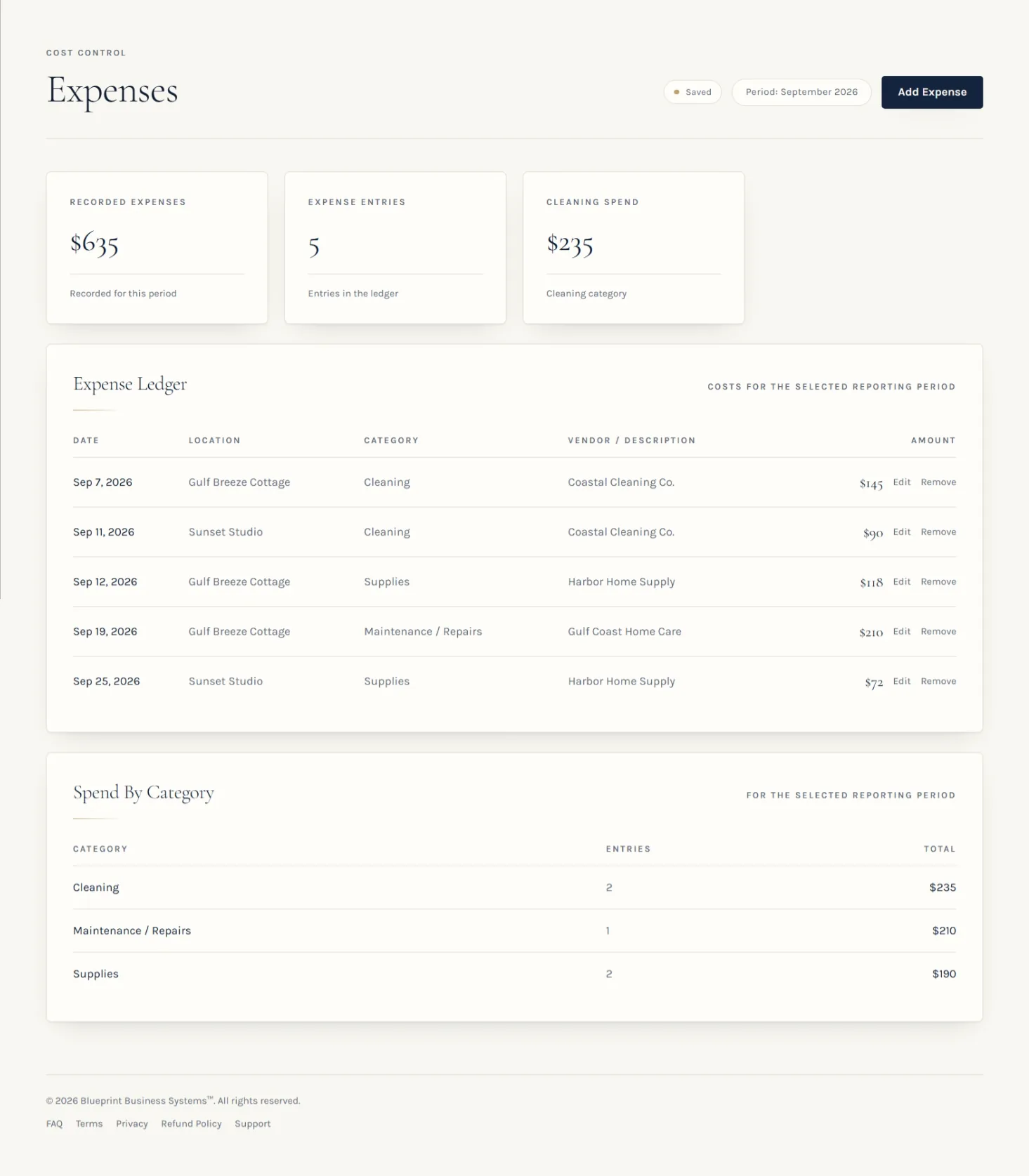
Blueprint sits at the record-keeping and visibility layer, before accounting. An owner records reservations, revenue, expenses, turnovers, supplies, and property-level operating information in one system, and Blueprint presents financial and operational views from that recorded information — including Recorded Revenue, Recorded Expenses, Net Profit, Profit Margin, Profit Per Night, and Recorded ADR, with property-level profitability and a Command Center that surfaces what needs attention.
Because expenses are recorded with a date, a property, a category, and a vendor, the property attribution described above is part of the record rather than something reconstructed afterward. Recorded results stay visibly distinct from the rates and fees saved during setup, so a projection is not mistaken for a result.
The limitations matter as much as the capabilities. Blueprint does not reconcile bank accounts, import bank or card feeds, categorize transactions automatically, match platform payouts, or connect to Airbnb, Vrbo, a PMS, or a financial account. It does not produce tax forms, file anything, or give tax advice, and it is not an accounting ledger or a substitute for a bookkeeper, accountant, or CPA. It does not store uploaded receipts or documents, and it does not count physical inventory in your property — supply coverage reflects the par levels and counts you record.
What it does is keep the operating record in one place, attributed and reviewable, so the information you eventually hand to a professional or to accounting software is less scattered than it would otherwise be.
Final takeaway
Good bookkeeping starts with good records. The less you have to reconstruct later, the easier it is to hand clean information to the professional or accounting system you use next.
Record stays and expenses as they happen, attribute both to a property, keep the supporting documents somewhere you can find them, and give the month a short review before it fades. Tax time then begins with organized information instead of a search.
Keep the operating record in one place
Blueprint lets you record reservations, revenue, expenses, turnovers, and supplies per property, and presents profitability and operating visibility from what you record. It is not accounting or tax software — it is the layer that keeps your records organized before they get there. One-time purchase, no recurring subscription.